New Billing Partner
OrthoVirginia is pleased to announce a new look and feel to our patient statements and more convenient customer service.
Statement appearance
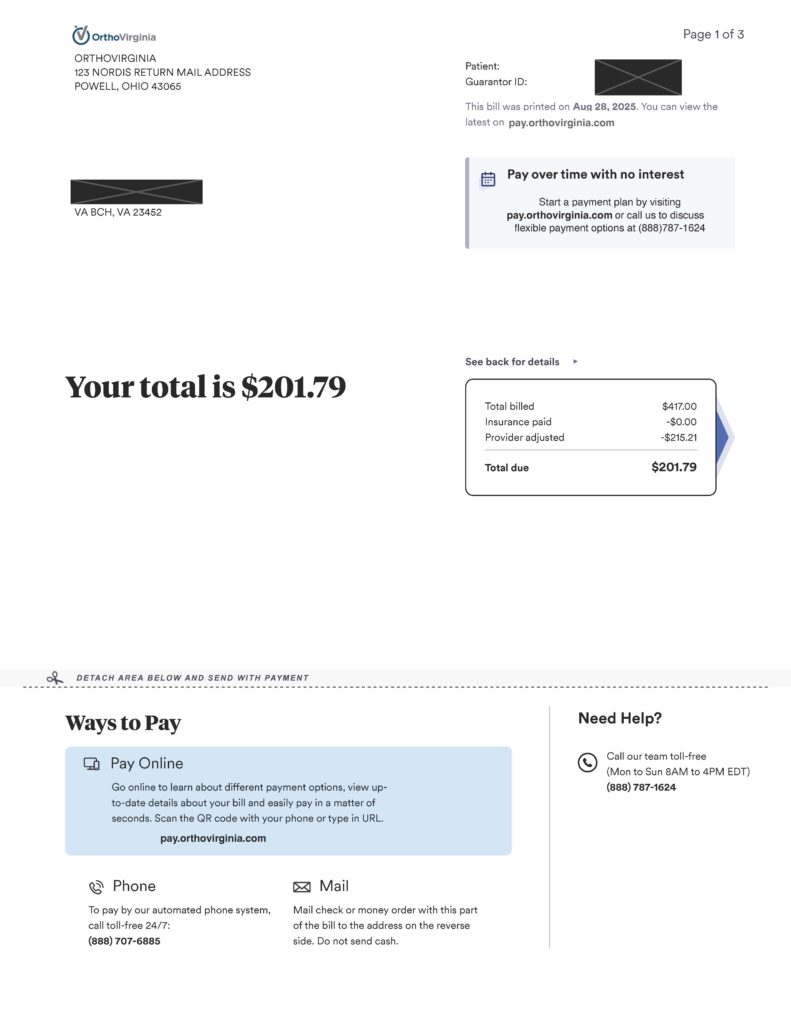
The new statements look like this example.
New convenient payment options
There are 3 ways to quickly and easily pay your bill.
- Online using the new payment portal at pay.orthovirginia.com
- By calling 888-707-6885
- By mailing a check
Payment portal
You can make payments quickly and easily online at pay.orthovirginia.com, view statements online and sign up for e-Statements.
Phone
Call 888-707-6885 to pay by phone at any time.
Please include your account number on your check. Send payments to:
OrthoVirginia
PO Box 715831
Philadelphia, PA 19171
Get support
If you have questions about your statement, please call 888-787-1624 to speak with our concierge staff directly Monday-Friday 8 a.m.–6 p.m.
Frequently asked questions (FAQs)
Email notifications will come from [email protected] and text message notifications will come from 888-707-6807.
Updated payment plan options make it easier to have a payment plan that works for your life.
For security reasons, your credit card information was not transfered to the new billing partner. You will need to input your credit card again.
If you have an email address and a cell phone number on file, you will receive a statement notifications via email and text as well as a paper statement.
If you would like to adjust your billing notifications in the new payment portal, including signing up for paperless statements:
- Go to pay.orthovirginia.com.
- Log in to your account.
- Click on your initials in the top-right corner and select “My Account”.
- Under “Billing Notifications”, select your preferred channels of communication.